AeroElite Configurator
3D steering-wheel configurator prototype, still in development.
- Role
- Designer & developer
In short
- 01
Two wheels (BMW M G8x, Audi B9) share 11 option groups priced in CAD
- 02
One GLSL grip shader zones the single-mesh rim by angle around the hub
- 03
~592k-triangle GLB with a ~150k lite variant; builds share via ?build= link
Built with Next.js 16 · React 19 · TypeScript · React Three Fiber · three.js · @react-three/drei · camera-controls · three-mesh-bvh · zustand · Tailwind CSS 4 · GLSL · Blender · glTF-Transform
Problem
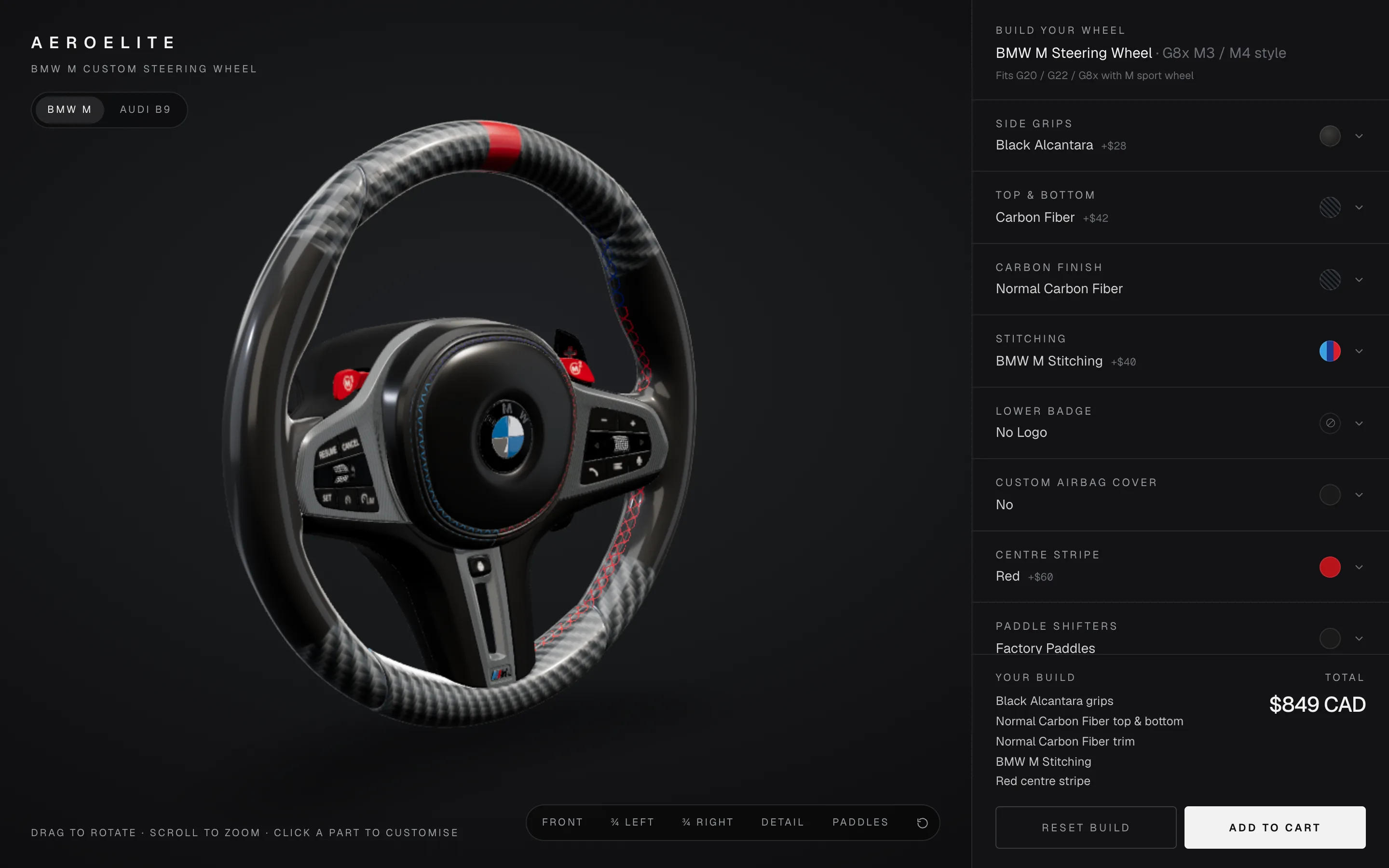
The AeroElite configurator lets a user build a custom BMW M (G8x) or Audi B9 steering wheel, see the CAD price update as options change, and save or share the result. The catalogue is modelled on a full aftermarket configurator, from side grips and carbon finish through paddles, an LED display and two priced add-ons.
My constraint for the BMW wheel was to use the third-party BMW M steering-wheel geometry exactly as authored in the source .blend and only swap materials on its existing meshes.
Approach
The BMW model is exported from Blender with modifiers applied and compressed with glTF-Transform (dedup, prune, WebP, quantize, meshopt): a full asset at subdivision level 2 (~592k triangles) and a lite one at level 1 (~150k) used below 820 px or on devices with four or fewer cores.
Blender object names map to parts in src/config/parts.ts; an entry matches a mesh by its own name or any ancestor's, so one name covers a multi-material group, and AFFECTED_MATERIALS limits which original material slots a part may replace. src/config/wheels.ts is a registry: the Audi B9 wheel, generated by a Blender script, reuses the same options with its own mesh map, grip zones, badge position and tiling. A ?debug=true panel shows FPS, draw calls and the scene tree and lets me override the mesh mapping at runtime.
Architecture
URL (?wheel ?build ?model ?debug)
  │
  ▼
Configurator ──────────► zustand store: build, price, section, camera, loading
  ├─ ConfigPanel ── setOption ─┘        │
  ├─ CartSheet ── encodeBuild → JSON download / share link
  ├─ LoadingOverlay ◄── byte-level download progress
  └─ Scene (React Three Fiber canvas)
       ├─ Studio: Lightformer IBL, key and rim lights, ACES tone mapping
       ├─ Wheel: useModelFile → useGLTF → prepareModel → applyBuild
       ├─ Addons: addons.glb (four paddle styles, LED housing)
       └─ CameraRig: camera-controls presets, section poses, idle sway
prepareModel clones the scene, gives each mesh its own material instance, fits the orientation, splits the paddle object and centres the root. applyBuild assigns materials per part: one GripMaterial for the grip ring, a cached MeshPhysicalMaterial per carbon finish for the spoke trim, a leather or Alcantara cover for the airbag, a StitchMaterial for the stitch meshes, and a canvas-drawn DecalGeometry badge raycast onto the 6 o'clock spoke.
Technical decisions
- One shader for the whole rim → the grip ring is a single mesh, so
GripMaterialselects side grips, top/bottom and the centre stripe by angle around the hub instead of cutting geometry. - PCA orientation fit at load → the file bakes a ~22° steering-column tilt into the vertices, so a plane fitted through the ring rotates the wheel to face +Z.
- Split the paddle object along world X → both blades are one object in the source; triangles are regrouped, not altered, so each side maps separately.
- Per-mesh material instances → highlights and swaps never bleed between parts.
- Reuse the model's own leather normal map → it was authored for this UV layout; the file's roughness texture reads too glossy raw, so a tiled roughness map replaces it.
- Azimuth clamped to ±150° → rear three-quarter views reach the paddles; full spins are not allowed.
Challenges
- The stitching came from a Blender node group driven by a mask atlas, which does not survive export.
StitchMaterialrebuilds it from the mask's green channel and a normal map derived from the atlas height, with the BMW M tricolour split by angle. - Texture tiling was measured against the model's UV islands with a checker texture (one UV unit ≈ 220 mm around the tube) to reach a ~3.5 mm perforation pitch.
- Loader SVG tick coordinates are rounded so server and client render identical attribute strings.
Results
The prototype is still in development. It is publicly accessible at aero-elite-configurator.replit.app with both wheels, the "Ignition sequence" loader and 11 option sections; the default BMW build totals $849 CAD. The cart sheet collects vehicle model, year and comments, downloads the configuration as JSON and copies a ?build= link that restores the build on load. The app is about 3.5k lines of TypeScript, and nothing is sold through it.
Kavin AI — an AI version of Kavin
Ask about AeroElite Configurator.
Kavin AI, the AI version of me, answers from the same approved write-up you just read.